MSR605X Software Download for Android USB
EasyMSR USB is the Android app for a compatible MSR605X magnetic stripe reader/writer connected by USB. Use this page to download the official app, check USB OTG requirements, connect the hardware, and troubleshoot common Android detection issues.
Quick check: this download is for an MSR605X using a wired USB connection. For an MSRX6 or MSRX6BT that connects over Bluetooth, use the MSRX6 software download page.
Official MSR605X Software Download

Download EasyMSR USB for MSR605X on Google Play
The store listing above is the recommended download source. It provides the current Android release and avoids unverified APK files from third-party download sites.
MSR605X Compatibility and Requirements
Before installing, confirm that your setup includes all of the following:
- A compatible MSR605X USB magnetic stripe reader/writer
- An Android phone or tablet with USB host/OTG support
- A USB OTG adapter or cable that fits both the Android device and reader
- Permission for EasyMSR USB to access the connected USB device
- Enough power for the reader; some mobile devices may require a powered USB hub
| Hardware or platform | Connection | Software to use |
|---|---|---|
| MSR605X | USB OTG | EasyMSR USB on this page |
| MSRX6 / MSRX6BT | Bluetooth | EasyMSR Bluetooth software |
| MSR90 | USB keyboard emulation | MSR90 software and setup guide |
| OSAYDE MSR880 | USB | MSR880 Android app |
Hardware sold under similar names can use different USB controllers. Check the model label and connection type before choosing an app.
How to Connect an MSR605X to Android
- Install EasyMSR USB from Google Play.
- Connect the MSR605X to the Android device with a compatible USB OTG adapter.
- Turn on the reader if your hardware has a power switch.
- Open EasyMSR USB.
- When Android asks whether the app may access the USB device, choose Allow.
- Run a read test with a card you are authorized to use before attempting other operations.
Android must recognize the USB device before the app can communicate with it. If no permission prompt appears, disconnect the reader, close the app, reconnect the adapter, and open the app again.
EasyMSR USB Features
With compatible hardware, EasyMSR USB can provide the following functions:
- Read supported magnetic stripe tracks
- Write supported track data to compatible cards
- Copy supported track data
- Erase selected tracks
- Import and export supported data files
- Work with common magnetic stripe data formats supported by the reader
Available operations depend on the MSR605X hardware revision and the card format. Only read or modify card data when you have permission from the card owner or system operator.
MSR605X Troubleshooting
Android does not detect the MSR605X
Confirm that the phone or tablet supports USB host/OTG mode. Reconnect both ends of the cable and try another known-good OTG adapter. If the reader does not power on, the Android device may not supply enough power; a compatible powered USB hub may help.
The USB permission prompt does not appear
Disconnect the reader, fully close EasyMSR USB, reconnect the device, and reopen the app. Also check Android settings to ensure USB access was not previously denied.
The reader connects but a read or write fails
Verify the exact model, card type, selected track, and data format. Similar-looking readers are not always protocol-compatible. Test with a card and operation already known to work with the hardware.
Should I install an MSR605X driver on Android?
Android uses USB host access rather than a traditional Windows driver. The phone must support USB OTG, and EasyMSR USB must receive permission to access the connected device.
Should I download an MSR605X APK from another website?
Use the official Google Play link above when possible. Third-party APK packages can be outdated or modified and do not provide the same update path as the official store listing.
About the MSR605X Reader/Writer
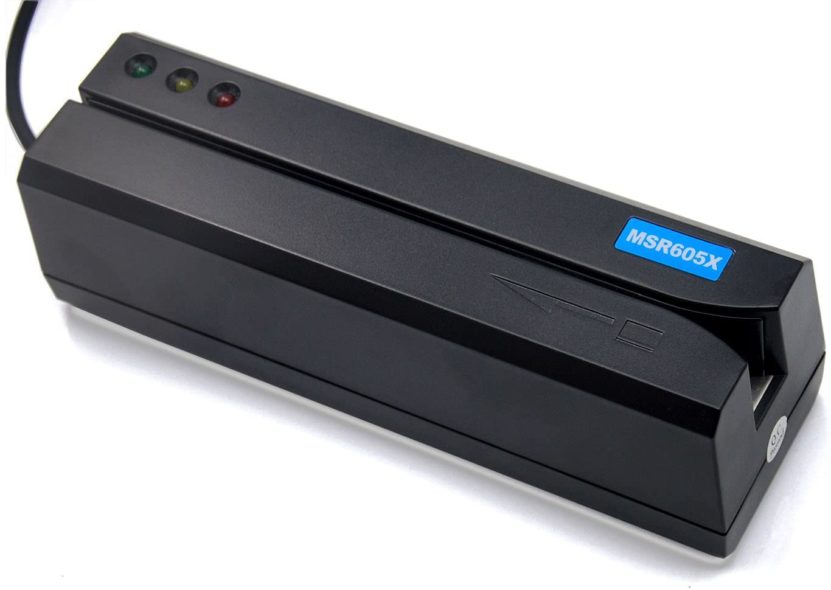
The MSR605X is a USB magnetic stripe reader/writer for compatible cards and track formats. To use it with EasyMSR USB on Android, confirm that your phone supports USB OTG and that you have a suitable adapter; hardware revisions can differ.
Buy MSR605X Reader/Writer on Amazon
Frequently Asked Questions
Is EasyMSR USB available for iPhone or iPad?
This MSR605X USB download is for compatible Android devices. iPhone and iPad do not use this Android USB app.
Is MSR605X software the same as MSRX6 software?
No. MSR605X uses a wired USB connection, while MSRX6/MSRX6BT normally uses Bluetooth. Choose the software based on the model label and connection method.
Can I use the app without USB OTG support?
No. The Android device must operate as a USB host to communicate with the reader. If you are unsure, check the phone or tablet manufacturer’s specifications.
Related EasyMSR Guides
- MSRX6 software download for Android and iOS
- MSR90 reader software and Windows setup
- EasyMSR software compatibility overview
- MSR880 Android app and software
For assistance, contact msr@tcool.ltd. Include your exact reader model, Android version, connection type, and the step that failed.